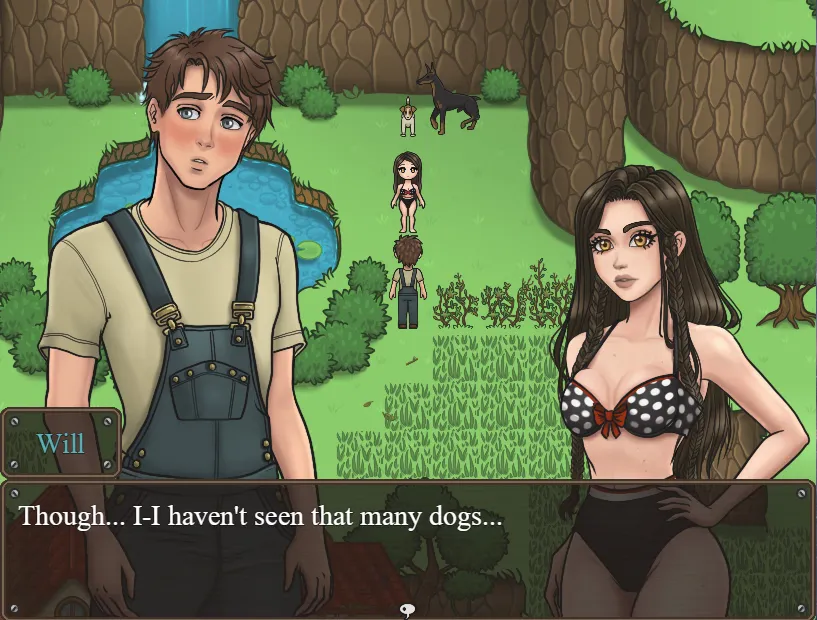

Once Upon a Farm
by Wild Kraken Studio
4.2 (7 votes)
RPGM
v0.1.1
Game Details
- Version
- v0.1.1
- Developer
- Wild Kraken Studio
- Engine
- RPGM
- Status
- Ongoing
- Language
- English
- Censored
- No
- Updated
- 1 August 2026
About
William Shepherd moves out to Morgan Farm to start over, and the game settles into the daily rhythm of chores, neighbors, and whatever grows out of both.
There's no grand crisis here, just a new arrival learning the place and the people on it, with the farm's residents becoming more familiar the more time he spends with them.
Days are spent helping around the farm and working through small tasks that open up conversations and events with the people living there. Choices steer who William grows close to and how those relationships play out, with the sandbox structure leaving the pace largely up to the player rather than a fixed script.
Changelog
v0.1.1
- Fixes
- Fixed an issue where the MC's sprite could sometimes be missing from the save menu.
- Fixed an issue where a character could briefly face the wrong direction.
- Fixed an issue where a character appeared in two places at once on the first day.
- UI & Localization
- Fixed a typo.
- Fixed several UI elements that were still displayed in Spanish in the English version.
- Improved the fridge CG task notes and their functionality (in both English and Spanish)
v0.1 - PUBLIC DEMO July 31, 2026
- INITIAL RELEASE
- CONTENT
- Introduced the main characters.
- Added the Morgan Farm and its explorable areas.
- Added the first story events, featuring both static and animated CGs.
- Added daily farm activities and tasks, with additional activities unlocking through progression.
- FEATURES & SYSTEMS
- Added farm progression and relationship systems.
- Added the Progress Journal.
- Added inventory and tool systems.
- Added English and Spanish language support.
- Added keyboard controls and shortcuts.
- KEYBOARD CONTROLS
- WASD / Arrow Keys — Move
- Enter / E — Interact
- Shift — Run
- J — Open / close Progress Journal
- I — Open / close Inventory
- Q — Equip / cycle through available tools
- Esc / X — Cancel / Back
- F5 — Disabled to prevent accidental game restarts

Talk about this game